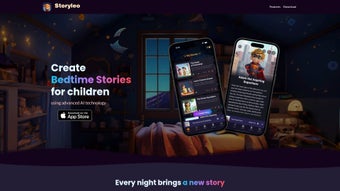

Download Storyleo – AI‑Powered Bedtime Stories for Kids
Storyleo is a forward‑thinking web app that brings the magic of bedtime storytelling into the digital age. Powered by advanced artificial intelligence, the platform lets parents generate one‑of‑a‑kind narratives tailored to each child’s imagination. Whether a youngster dreams of soaring through space as an astronaut, battling villains as a superhero, or wandering enchanted forests with talking animals, Storyleo creates a seamless blend of personal preferences and classic storytelling structures.
The service goes beyond text by automatically turning each custom tale into a high‑quality audiobook, so children can listen to their favorite stories on a nightstand speaker, a tablet, or a pair of headphones. Integrated iCloud synchronization means every story is instantly available on any iPhone or iPad linked to the family’s Apple ID, eliminating the need for manual transfers or printed copies. Parents have praised the app for its ease of use, the depth of personalization, and the soothing routine it helps establish at bedtime.
In short, Storyleo is more than a story generator—it’s a creative companion that nurtures imagination, encourages listening skills, and turns the nightly wind‑down into an adventure every child looks forward to.
Core Features That Set Storyleo Apart
- AI‑Generated Personalization: Input a child’s name, favorite character type, and preferred theme; the engine crafts a story that feels uniquely theirs.
- Rich Character Library: Choose from superheroes, astronauts, fairies, dinosaurs, and more, with the ability to mix and match for hybrid protagonists.
- Theme Variety: Adventure, science‑fiction, fairy‑tale, mystery, and educational themes ensure there’s a perfect fit for every interest.
- One‑Click Audiobook Conversion: Stories are automatically rendered into clear, child‑friendly narration with optional background music.
- iCloud Sync Across Devices: All created stories and audiobooks are stored securely in the cloud and instantly accessible on any registered iPhone or iPad.
- Voice‑Control Compatibility: Works with Siri shortcuts, allowing parents to launch a story hands‑free during bedtime rituals.
- Secure Data Handling: No personal data is sold; stories are encrypted in transit and at rest, complying with COPPA and GDPR standards.
- Regular Content Updates: The AI model receives monthly updates, adding new characters, plot twists, and voice styles to keep the experience fresh.
- Family Sharing: Up to six family members can share a single subscription, each with their own personalized story vault.
- Offline Playback: Downloaded audiobooks can be played without an internet connection, perfect for travel or low‑signal environments.
Step‑by‑Step Installation & Usage Guide
Getting started with Storyleo is intentionally straightforward, allowing even non‑tech‑savvy parents to dive right in. First, visit the official Storyleo website on any modern browser (Safari, Chrome, or Firefox) and click the “Get Started” button. You’ll be prompted to create a free account using an email address or Apple ID; the latter option automatically links the app to your iCloud account for seamless sync. After confirming your email, download the companion iOS app from the App Store – the process takes less than two minutes on a typical 4G/5G connection.
Once installed, open the app and sign in with the same credentials you used on the web portal. The home screen presents a clean dashboard with three primary actions: “Create New Story,” “My Library,” and “Settings.” Selecting “Create New Story” launches a wizard that asks for the child’s name, age range, favorite character archetype, and desired theme. The AI instantly begins drafting a 500‑ to 1,000‑word story, displayed in a preview pane where you can fine‑tune details or request a rewrite with a single tap.
When satisfied, hit the “Generate Audiobook” button. Storyleo processes the text through a text‑to‑speech engine that supports multiple voice options (soft male, warm female, whimsical child‑like). After a short rendering period (usually under 30 seconds), the audio file appears in “My Library,” ready for playback. The library view also shows a thumbnail of each story, the date created, and a quick share icon for sending a link to a family member’s device.
For families that prefer a traditional bedtime reading experience, the app includes a “Read Aloud” mode that highlights each sentence as the narration proceeds, encouraging interactive listening. Parents can also set a bedtime timer that automatically stops playback after a chosen duration, helping to keep nighttime routines consistent.
Finally, to ensure your stories are always safe and accessible, enable iCloud backup in the Settings menu. With this turned on, any new story or audiobook you create is instantly uploaded to Apple’s secure cloud infrastructure, making it available on every registered iPhone, iPad, or even a Mac via the web portal. Should you ever switch devices, simply log in with your existing account and all your content will re‑appear, no manual migration required.
Compatibility, Pros & Cons
Storyleo is designed primarily for Apple ecosystems. The web version runs on any modern desktop browser (macOS, Windows, Linux) but the full feature set—including iCloud sync and offline playback—is optimized for iOS 14+ and iPadOS 14+. Android users can still access the web portal through a browser, though native app functionality (such as Siri shortcuts) is unavailable.
Pros
- Highly personalized stories that keep children engaged.
- Instant audiobook conversion eliminates the need for external narration tools.
- iCloud synchronization provides hassle‑free access across multiple Apple devices.
- Secure, child‑friendly data handling meets strict privacy regulations.
- Regular AI updates keep the content fresh and diverse.
- Family sharing reduces cost per household.
- Offline playback works perfectly for travel or low‑bandwidth situations.
Cons
- Full native experience limited to iOS/iPadOS; Android users must rely on the web version.
- Subscription model may deter families looking for a completely free solution.
- Story length capped at ~1,500 words per generation, which may be short for older children.
- Voice options, while pleasant, are limited compared to premium TTS services.
- Requires an Apple ID for iCloud sync, which not all families may wish to use.
Frequently Asked Questions
Can I use Storyleo without an internet connection?
Yes. Once a story and its audiobook are generated and downloaded to your device, you can play them offline. The iCloud sync feature does require an internet connection, but playback itself works perfectly without it.
Is my child’s personal data safe?
Storyleo adheres to COPPA and GDPR standards. All personal data (including the child’s name) is encrypted in transit and stored securely. The company does not sell or share data with third‑party advertisers.
Can I customize the voice of the audiobook?
Yes. The app offers three built‑in voice styles—gentle male, warm female, and whimsical child‑like. You can preview each voice before finalizing the audiobook, and you can switch voices for any existing story at any time.
How many stories can I generate per month?
The standard subscription allows unlimited story generation. However, each individual story is limited to a maximum of 1,500 words to keep processing times short and maintain high‑quality narration.
Do I need an Apple device to use Storyleo?
While the full native app requires an iPhone or iPad, you can still access Storyleo through any modern web browser on Windows, macOS, or Android. The web version provides story creation and playback, but iCloud sync and Siri shortcuts are exclusive to Apple devices.
Storyleo transformed our bedtime routine. My kids love hearing stories where they are the hero, and the audiobooks keep them calm even when the phone is out of reach. The iCloud sync means I can start a story on my iPhone and finish it on the iPad without missing a beat. Highly recommended for any family looking to spark imagination.
Conclusion & Call to Action
In an era where screens dominate children’s attention, Storyleo offers a refreshing blend of technology and timeless storytelling. By harnessing AI to craft personalized narratives and instantly converting them into soothing audiobooks, the app empowers parents to nurture creativity while simplifying bedtime logistics. The seamless iCloud integration ensures that every tale is just a tap away, whether you’re on the couch, in a hotel room, or on a family road trip. While the platform shines brightest within the Apple ecosystem, its web version still delivers core functionality to a broader audience. The modest subscription cost is justified by unlimited story generation, regular AI enhancements, and robust privacy safeguards.
If you’re ready to turn bedtime into an adventure that your children will look forward to each night, download Storyleo now and start creating unforgettable stories today. Join the growing community of parents who have discovered a smarter, more imaginative way to say goodnight.



.png)



